


Map symbols: reading Aqua Map's nautical charts
Aqua Map charts are designed to be clear and intuitive, using realistic colors and standardized symbols so you can read the water at a glance, whether you're a first-time boater or a seasoned captain. This page is your full reference legend, covering every symbol category used across Aqua Map's charts.
One thing worth knowing before you dive in: these symbols apply to vector charts. If you're viewing a raster chart, symbols will appear exactly as they do on the original paper chart it was scanned from.
Buoys and beacons: lateral marks
Lateral marks show you the edges of a channel, and their meaning depends on which IALA buoyage region you're navigating in (more on that below).
- Green lateral mark (buoy
 or beacon
  ). Under IALA "A," this marks the port side of a channel. Under IALA "B," it marks the starboard side.
 - Red lateral mark (buoy
or beacon
 ). Under IALA "A," this marks the starboard side. Under IALA "B," it marks the port side.
 - Bifurcation mark (buoy


 or beacon


 ). This indicates a channel splits in two, a preferred channel on one side (typically the deeper channel, suited for heavier traffic) and a secondary channel on the other. The color on top tells you which channel is preferred, and the color below indicates the secondary one.
Understanding the IALA system
Here's the part that trips a lot of people up: lateral marks mean the opposite thing depending on where in the world you're sailing.
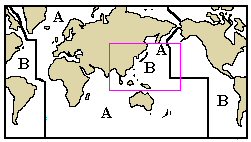
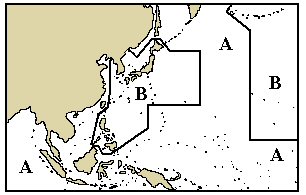
The world is split into two IALA buoyage regions:
- IALA "A" covers Europe, Africa, Australia, New Zealand, and most of Asia (with the notable exceptions of Japan, the Koreas, and the Philippines);
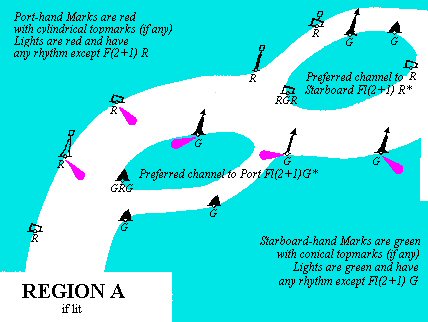
- IALA "B" covers the Americas, Japan, the Koreas, and the Philippines.
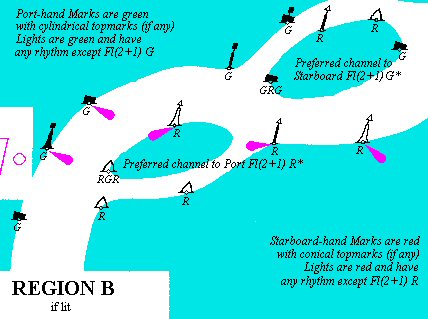
If you're used to navigating in one region and find yourself in the other, it's worth double-checking your lateral marks before you rely on habit.
Buoys and beacons: cardinal marks
Cardinal marks tell you which compass direction (North, South, East, or West) you need to pass on to stay in safe water, relative to the mark itself. Aqua Map shows all four: North 
 , South
 , East
 , and West
 ) cardinal marks, each as both a buoy and a beacon icon.
You can identify a cardinal mark three ways as follows.
- The orientation of its top-marks. Two cones pointing up mean North, pointing down means South, pointing toward each other means West, and pointing away from each other means East.
- Its black-and-yellow stripe pattern, which follows the same logic as the cones, for example, the black stripe sits at the top on a North mark and in the middle on a West mark.
- Its light-flash sequence, where applicable. The number of flashes corresponds to a clock face: three flashes for East, nine for West. North flashes continuously, and South often adds a long flash to avoid confusion with West in low visibility.
Cardinal marks are used to point out where the deepest water lies relative to the mark, flag the safe side to pass a hazard, highlight channel features like bends or shoal ends, or warn of a brand-new danger, like a recent grounding, that hasn't made it onto official charts yet. In that last case, you'll often see two identical cardinal marks placed together.
Other buoys and beacons
Beyond lateral and cardinal marks, Aqua Map also displays the following ones.
- Isolated danger marks

 , flagging an isolated hazard with navigable water around it.
- Safe water marks

 , indicating open, navigable water on all sides.
- Special purpose marks


 , used for anything from anchorage areas to traffic separation zones.
- Buoy installations
 and mooring buoys
  .
.
Lights
Lighted aids to navigation appear with their own dedicated symbols, including single-color lights 


 , multi-colored lights
  , floodlights
  , strip lights
  , and light vessels
  . Fog signals, covering bells, horns, whistles, gongs, and similar sound devices, are also marked with their own distinct icon
  .
.
Dangers
Hazards are grouped into a few clear categories:
- rocks: emerged
 , submerged
  , or flagged as dangerous
  ;
; - wrecks: emerged
 , submerged
  , or flagged as dangerous
  ;
; - bottom obstructions
 , marking anything else hazardous on the seabed;
 - cables
 , shown as a line if it's a single cable, or as a boundary if it covers a wider area.
Restricted and regulated areas
These symbols flag zones with specific rules or restrictions, including areas where anchoring  , diving
  , fishing
  , or general entry is prohibited
  or restricted
  , as well as military practice areas
  and designated seaplane landing zones
  .
.
Other marine objects
This category covers everything else you might encounter on the water: marshes and swamps  , offshore platforms
  , piles
  , radar reflectors
  and radar stations
  , radio call-in points
  , and areas of water turbulence
  .
.
Marine points of interest
Aqua Map also marks practical points of interest for mariners, including boat ramps  , coast guard stations
  , ferry crossings
  , marinas
  , and ports or port agencies
  .
.
Landmarks
Onshore landmarks help with visual navigation and orientation, and Aqua Map includes a wide range of them: benchmarks  , buildings
  , cemeteries
  , checkpoints
  , chimneys
  , churches
  , cranes
  , dams
  , dish aerials
 .png) , flagpoles
, flagpoles  , flare stacks
  , fortified structures
  , lighthouses
  , masts
 (lit and unlit), observation points
  , parks and forests
  , silos
  , triangulation points
  , towers
 (lit and unlit), waterfalls
  , and water towers
  .
.
Fishing chart symbols (Italy only)
For users navigating Italian waters, Aqua Map includes a dedicated set of fishing chart symbols: onshore fishing spots  , boat fishing spots
  , spearfishing areas
  , warning areas
  , forbidden areas
  , regulated areas
  , coast guard stations
  , fishing shops
  , and general information points
  .
.
Symbols for land data
For symbols used specifically in Aqua Map's land data layers, see the Terra Map legend.
